Relative URLs
The general format of a simple URL:
http://www.website.com/catalog/usa/texas/dallas/products.html
Parts:
- Scheme: http://
- Host: www.website.com
- Path: /catalog/usa/texas/dallas/products.html
Examples of Full URLs:
- http://www.mmlab2.rlc.dcccd.edu/
- http://www.mmlab2.rlc.dcccd.edu/advweb2/
- http://www.mmlab2.rlc.dcccd.edu/advweb2/index.html
Examples of Relative URLs:
- /IMED1416/
- ../images/dog.gif
- ../../../../../../../../../../../../../../../../../../../../../menu.html
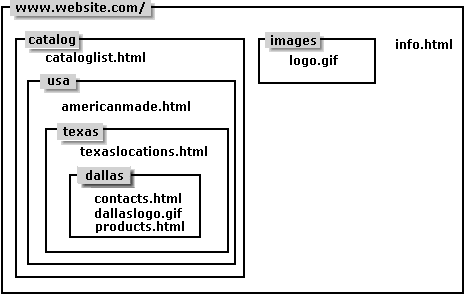
Our imaginary web site:
In the products.html file, if we wanted:
- Link to "contacts.html" in /catalog/usa/texas/dallas
- Link to "texaslocations.html" in /catalog/usa/texas
- Link to "americanmade.html" in /catalog/usa
- Link to "cataloglist.html" in /catalog
- Link to "info.html" in /
- Use image "dallaslogo.gif" in /catalog/usa/texas/dallas
- Use image "logo.gif" in /images
Solution #1:
- a href="http://www.website.com/catalog/usa/texas/dallas/contacts.html"
- a href="http://www.website.com/catalog/usa/texas/texaslocations.html"
- a href="http://www.website.com/catalog/usa/americanmade.html"
- a href="http://www.website.com/catalog/cataloglist.html"
- a href="http://www.website.com/catalog/info.html"
- img src="http://www.website.com/catalog/usa/texas/dallas/dallaslogo.gif"
- img src="http://www.website.com/images/logo.gif"
Problems with Solution #1
- What if your host name changes to www.catalog.website.com?
You have to go back and change every single URL!
- What if the catalog directory has to be moved to a directory called morestuff?
You have to change url from
http://www.website.com/catalog/.... to
http://www.website.com/morestuff/catalog/....
- You can't develope your site on a local workstation since all links will be sending to the web rather than your local machine.
Solution #2:
- Leave out the host name since any links or images will be fetched from the same host as the original html document.
SO:
- a href="/catalog/usa/texas/dallas/contacts.html"
- a href="/catalog/usa/texas/texaslocations.html"
- a href="/catalog/usa/americanmade.html"
- a href="/catalog/cataloglist.html"
- a href="/catalog/info.html"
- img src="/catalog/usa/texas/dallas/dallaslogo.gif"
- img src="/images/logo.gif"
When a URL begins with a "/" it is assumed to come from the same server and it will start looking for the file from the top of the directory structure. If you using the url
"catalog/usa/texas/dallas/contacts.html" if would assume that the catalog directory was in the dallas directory.
Problems with solution #2
- What if the catalog directory has to be moved to a directory called morestuff?
You have to change url from
/catalog/.... to
/morestuff/catalog/....
- You can't develope your site on a local workstation since a url beginning with "/" doesn't mean anything for getting the file off the local harddisk (you'd think it would look to the
root directory of the local harddisk but it doesn't!)
Solution #3 - The Best Approach
- Use relative URLS where "../" means look in the higher directory:
- a href="contacts.html"
- a href="../texaslocations.html"
- a href="../../americanmade.html"
- a href="../../../cataloglist.html"
- a href="../../../../info.html"
- img src="dallaslogo.gif"
- img src="../../../../images/logo.gif"
These files and directories are at the same levels:
- catalog images info.html
- usa cataloglist.html
- texas americanmade.html
- dallas texaslocations.html
- contacts.html dallaslogo.gif products.html
As an additional exercise:
To link to the texaslocations.html from each of the directories the relative URL would be:
|
/ |
|
catalog/usa/texas/texaslocations.html |
|
images |
|
../catalog/usa/texas/texaslocations.html |
|
catalog |
|
usa/texas/texaslocations.html |
|
usa |
|
texas/texaslocations.html |
|
texas |
|
texaslocations.html |
|
dallas |
|
../texaslocations.html |
For more information:
Check out the W3C's RFC at http://www.w3c.org/Addressing/rfc1808.txt