PHP Processing Flow
The following diagram will give you a rough idea of how the information requests and responses flow among the browser, the Web Server, the PHP Server, the database server, and the SMTP (e-mail) server when you display a PHP page in your browser.
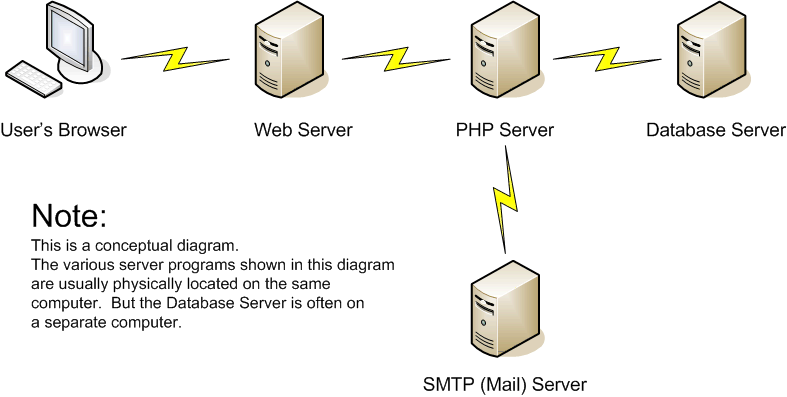
- You request the page -- either by clicking a link, or by typing the URL in the Address box of the browser.
- A request for the page is sent to the Web Server by the browser. (Along the way, a Domain Name Server (DNS) translates the URL into an IP address.)
- The Web server sees ".php" as the file extension of the page.
- The Web server forwards the request to the PHP server.
- The PHP server processes the page. It builds an HTML page as it processes the PHP tags that it finds.
-
If the PHP server finds a database command in the page:
- The PHP server sends a request to the database server for some database processing.
- The database server processes the request and sends the database information back to the PHP server.
- The PHP server processes the database information and adds the information to the HTML page that it is building.
-
If the PHP server finds an e-mail command in the page:
- The PHP server sends an outgoing e-mail message to the SMTP (e-mail) server.
- The SMTP (e-mail) server reports that it received the outgoing e-mail message.
- The PHP server completes the process of building the HTML page. It sends the HTML page back to the Web server.
- The Web server sends the HTML page back to the browser.
- The browser interprets and displays the HTML page.
Please note these points about the above explanation:
- The process is almost the same even if you request a page that is on your local machine, if you have a local PHP server installed. The main difference is that a DNS is not involved.
- The "computers" in the diagram are intended to show that the Web and PHP servers and the database server are sometimes on different computers. But the Web server and the PHP server must be on the same computer.