Assignment #6: The Window, Location, and Navigator Objects
-
For this assignment, you will make an HTML page which automatically redirects
the user to one of four "seasonal" pages, depending on what season
of the year that we are in.
-
Each "seasonal" page will have links in it, which open
other pages which contain an image (appropriate to the season).
- So you will be making at least nine pages
in all:
- The main assignment page which your site's index.html page will link to
- The four "seasonal" pages which the main page will automatically redirect the user to
- At least four pages which contain an image, to be linked to from the "seasonal" pages.
-
The main page, which does the automatic redirecting, should use these features
of JavaScript:
- The built-in method Date.getMonth()
- The window.location.href property
-
Use the Date.getMonth() built-in method like this:
- Create a Date() object: var theDate = new Date();
- Get the current month: var theMonth = theDate.getMonth();
- Use the month number to decide what the season is, according to the list just below. Recall, please, that 0 is January, and 11 is December.
-
Use these criteria to decide which "seasonal" page to automatically redirect the user to (from the main assignment page):
- If the month is December, January, or February, redirect to the "winter" page.
- If the month is March, April, or May, redirect to the "spring" page.
- If the month is June, July, or August, redirect to the "summer" page.
- If the month is September, October, or November, redirect to the "fall" page.
-
On each of the four pages which the main page automatically redirects the user to,
put at least one link which opens a new browser window to display a new page which contains an image
that is appropriate to the season. Each of these links should use these
features of JavaScript:
- An onclick event handler
- The window.open() method, with these features in the "features" list in the third argument (for the new window which opens):
- 600 pixels wide
- 400 pixels high
-
Which also means that your "image" windows should have
these items in the feature list turned off (=no):
- Location (address) field
- Menu bar
- Resizable (thick) border
- Status bar
- Tool bar
- Each image page that is displayed by the links on the "seasonal"
pages will have these features:
- An <img> tag, with appropriate src attribute, width attribute, height attribute, and alt attribute
- A "Close" button or hypertext link
- Hints:
-
Here is a diagram of the pages that you will be making for this assignment:
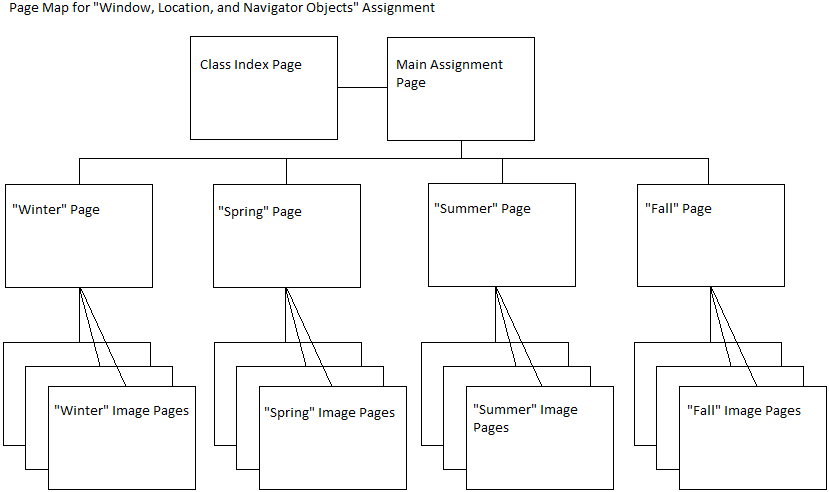
- You will be making at least nine HTML pages: The main page which your index.html page will link to, the other four "seasonal" pages which the main page will redirect the user to, and at least four pages which contain an image.
- The first two features (600 by 400 pixels) of each image that is opened from the "seasonal" windows will be specified in the window.open( ) method.
- The "close" button or link in each image window
will be an input type "button" control or an <a href> tag that uses an onclick
event handler to call a method which closes that image window.
Use this feature of JavaScript:
- The window.close() method
-
Here is a diagram of the pages that you will be making for this assignment:
-
Add a hypertext link to the
index.html file that is in your class folder. Make this hypertext
link display the html page that you made for this assignment.
-
Validate your pages using the
W3C HTML Validator.
(The Validator will automatically detect whether you have an XHTML or an HTML5
document.)
-
Test your pages to make sure they have no errors in them. (You should
turn on the display of script errors in your browser!) Here are some
instructions on how to turn
on JavaScript error messages.
-
Upload your files to your class folder. You will
need to use an FTP program to upload the files. You will find
some general FTP instructions on a page called "FTP
Instructions".